Building TurboRelic: a Yocto distro for the Anbernic RG353V, from first boot to a hot pink web dashboard
Seven weeks, 62 libretro cores, a custom web dashboard streaming the screen in HW-encoded MJPEG, and the BSP decisions I'd make again.
I picked up an Anbernic RG353V - a €100 Rockchip RK3566 handheld - somewhere around the end of February 2026. By mid-April it was running a custom Yocto distro I built from scratch, with 62 libretro cores, Moonlight game streaming, a Wayland compositor, a hot-pink web dashboard that streams the screen back at 60fps over hardware-encoded MJPEG, and six pygame diagnostic ports written for the device itself.
Seven weeks, ~45 ADRs (architecture decision records), and roughly 7,700 bitbake tasks per gaming-image build. This is the writeup of what went into it, what I’d do again, and what I’d rip out.
The project is called TurboRelic. It is, to my knowledge, the only from-scratch Yocto distribution for this device.
The brief
The device already had two usable options: Batocera (buildroot-based, huge ecosystem), and the vendor’s Android + RetroArch image. Neither was what I wanted.
- Batocera is a fine product but it’s buildroot all the way down. If you want to cherry-pick upstream fixes, or ship a reproducible SDK, or derive a customer-specific image from the same recipes, buildroot starts fighting you fast.
- Vendor Android is Android.
The brief I gave myself:
- Yocto-based, reproducible, driven by
kas-containerso anyone can rebuild the whole distro with a single command. - Retro emulation on par with Batocera - same frontend (EmulationStation), same configgen-driven RetroArch, same set of cores.
- Moonlight game streaming from my Ghibli desktop over WiFi.
- A web dashboard on the device to control it from a phone. (This one was mission-creep. It became my favorite part.)
- A/B rootfs with OTA updates via SWU, because I was going to brick this thing a lot.
The stack
TurboRelic/
├── kas/
│   ├── base.yml
│   └── gaming.yml
├── meta-rg353v/        # ours - BSP + integration
├── meta-retro/         # ours - 62 libretro cores
├── meta-swupdate/      # swupdate A/B OTA framework
├── meta-openembedded/  # standard
└── poky/               # scarthgap
Five layers. meta-rg353v is where the hardware lives - machine config, device tree fragments, kernel cfg, U-Boot patches, ALSA state, gamepad-merge daemon, tool ports, web dashboard. meta-retro is an out-of-tree layer I maintain for RetroArch + 62 libretro cores.
Build:
kas-container build kas/base.yml:kas/gaming.ymlThat gives you rg353v-image-gaming.wic.img (~2.6 GiB sparse) and rg353v-image-gaming.swu for OTA updates. One command, reproducible, no host contamination.
The hardware, one paragraph
RK3566 (quad-core Cortex-A55, Mali G52 GPU). 2 GB LPDDR4. 32 GB eMMC. 3.5" 640×480 DSI panel (ST7703 V2). WiFi/BT combo on SDIO (RTL8821CS). rk817 audio codec (SoC-internal). Analog sticks via SARADC + GPIO-muxed channels. Face buttons via gpio-keys. Dual SD slot. USB 3.0 OTG. Hantro VPU for hardware video encode/decode. It’s a small Rockchip reference board in a plastic shell, and that’s most of what you need to know.
Five stage gates, seven weeks
I ran the project as five sequential stage gates. No work on stage N+1 until stage N was validated on hardware. It’s a discipline I use on client projects and it’s saved me from a LOT of stacked debugging.
| Stage | What | Done on |
|---|---|---|
| 1 | Kernel boots, framebuffer console visible | 2026-02-28 |
| 2 | All peripherals recognized (WiFi, audio, gamepad, GPU) | 2026-03-01 |
| 3 | rg353v-image-base boots cleanly to shell | 2026-03-03 |
| 4 | rg353v-image-gaming launches ES + RetroArch | 2026-03-16 |
| 5 | Moonlight streams from ES | 2026-03-17 |
Stage 4 was the long one. Stages 1-3 were three days because the Rockchip mainline support for RK3566 is actually pretty good now - the real work was in the BSP integration (display power, SDIO WiFi, gamepad, audio routing). Stage 6 (“polish + optimization”) is the ongoing phase and is where most of the interesting work lives.
The things that almost broke me
Display: mainline ATF doesn’t power the VO domain
First boot: U-Boot loads, kernel boots, no display. Second boot: display works. Cold boot: no display.
Spent a week on this. Batocera doesn’t hit it because Batocera’s U-Boot carries a specific patch that enables the VO (video output) power domain before jumping to kernel. Mainline ATF + mainline U-Boot will boot the kernel in a state where the display is not powered, and the kernel silently assumes somebody upstream of it did the right thing.
Fix was three lines in the U-Boot tree plus:
CONFIG_FRAMEBUFFER_CONSOLE=yCONFIG_FRAMEBUFFER_CONSOLE_DETECT_PRIMARY=yCONFIG_FRAMEBUFFER_CONSOLE_ROTATION=y
I also tried the “modern” route - KMS-only, no fbcon, let the compositor own everything. Wasted another week. At 640×480 the extra layer doesn’t buy you anything, and the splash-screen bootchain is dramatically simpler with fbcon in place. My ADR-031 reverted that decision and pinned us to fbcon + fbdev client.
WiFi: the RTL8821CS combo chip
SDIO WiFi would fail to associate on about one boot in three. Error was -110 (ETIMEDOUT) on the SDIO probe.
Turns out the RTL8821CS is a combo WiFi+BT chip, and without CONFIG_BT_HCIUART_RTL=y in the kernel config, the BT firmware doesn’t load in the right sequence, which somehow destabilizes the SDIO side. Enable the Bluetooth UART driver even if you don’t plan to use Bluetooth. WiFi becomes 100% reliable.
I don’t fully understand this one. I have read the driver sources. I still don’t fully understand it. It just is.
Audio: the rk817 SPK/HP mux defaults to silence
rk817 has two output paths - speakers and headphones. The Playback Mux control defaults to HP=0 on cold boot. If no headphones are plugged in, you get silence, and the jack-detect event never fires because nothing was inserted.
Fix is an ALSA state recipe that ships an asound.state setting the mux to SPK, plus a udev rule + small shell script that toggles on jack events:
# 90-alsa-jack.rules
SUBSYSTEM=="input", ATTRS{name}=="rk817_int Headphones", \
  ENV{ACTION}=="change", RUN+="/usr/bin/alsa-jack.sh"
Volume also defaults to near zero. We ship at 201/255 (~-20 dB). Loud enough to hear, not loud enough to kill the cheap speaker.
Gamepad: merging three input devices into one
The RG353V has analog sticks on SARADC, face buttons on gpio-keys, and the D-pad on its own adc-keys channel. RetroArch sees three separate input devices and gets confused about which slot owns what.
Solution was a small userspace daemon - gamepad-merge - that listens on all three /dev/input/event* sources, merges them, and emits a single synthesized uinput device called RG353V Gamepad. RetroArch and EmulationStation only see the merged one. Ships as a systemd service.
It’s 120 lines of C. It’s the single most under-appreciated piece of the whole distro.
Stage 6: where it got fun
Once the core stack worked, I spent the rest of the project on polish and features. The list runs long, so here’s what mattered most:
TurboRelic Deck - the hot pink web dashboard
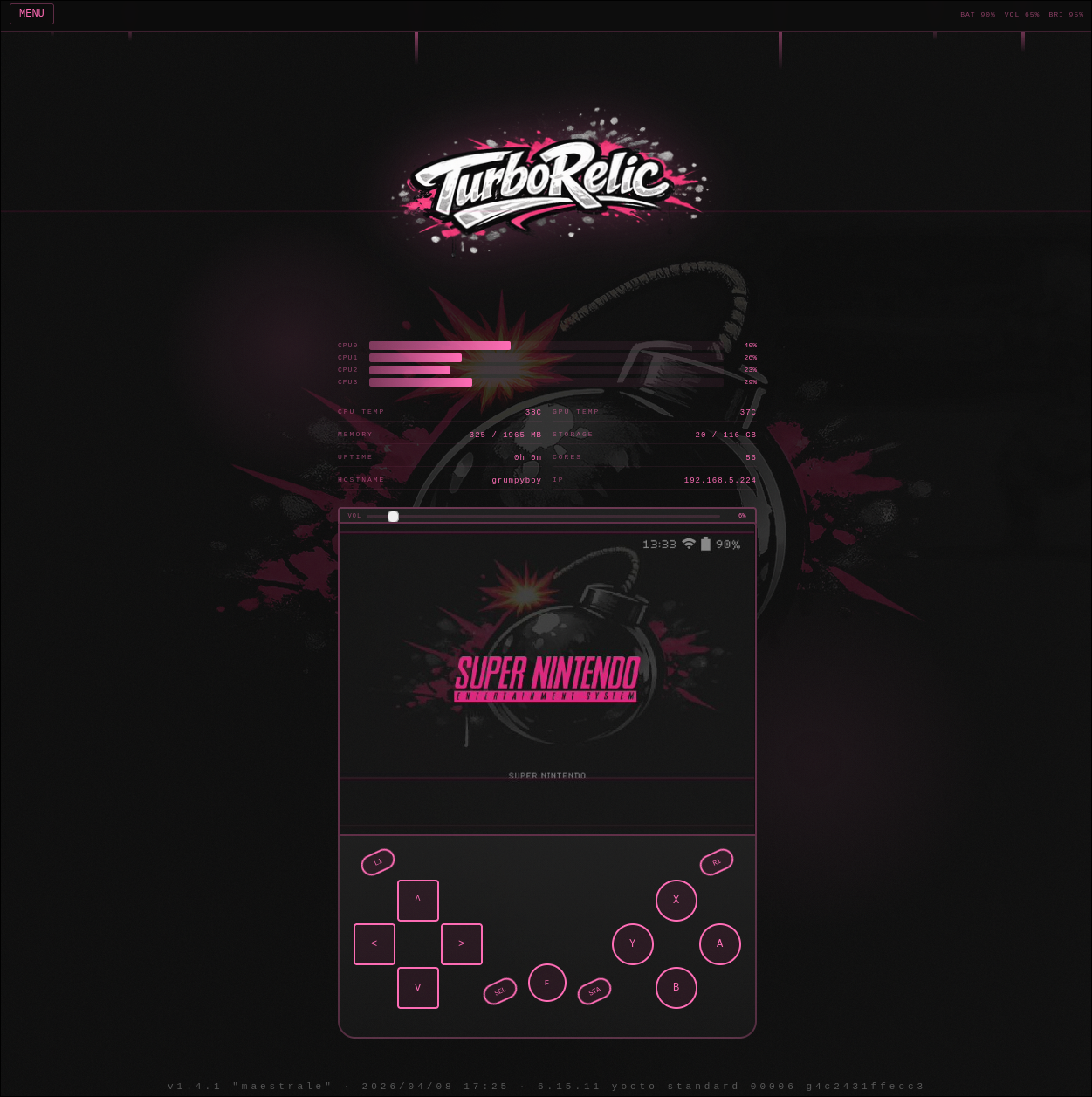
Runs on port 80 on the device. Connect from your phone on the same WiFi, bookmark it, point your browser at http://rg353v.local/.
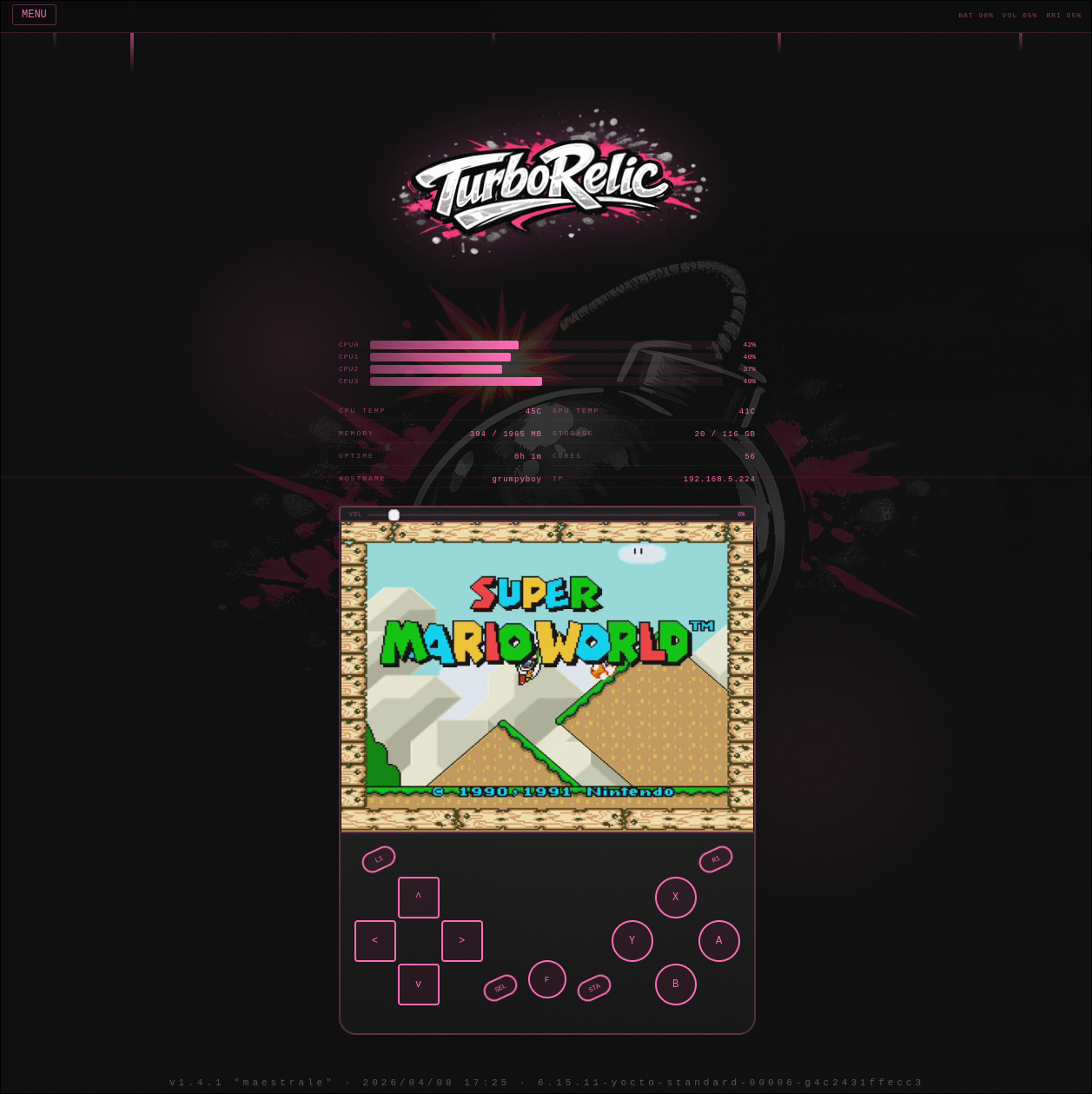
What it does:
- Live screen stream at 60fps over MJPEG. This is hardware-encoded: I tap the sway DRM buffer via
drmModeGetFB2, export it as a DMA-BUF, wait for vblank, memcpy a snapshot, convert to YUV420P, and feed it into the Hantro VEPU via V4L2 M2M. Zero impact on sway. Encoded on the GPU-adjacent hardware block that was never going to do anything else. - Virtual gamepad - browser touch/click events injected as uinput into the merged gamepad. I played an entire SNES session from my laptop while the device sat on my desk face-down. Sticky F-hotkey because it turns out you need “F+Start” a lot.
- Real gamepad passthrough - browser Gamepad API → uinput. Your phone’s Bluetooth controller can drive the device via the web UI.
- CPU monitor - live 4-core bar graphs, 1.5s refresh.
- Volume + brightness sliders wired to ALSA + sysfs backlight.
- Music player - library browser, upload OGGs, play/pause/skip.
- DPMS-aware - stream auto-stops on sleep, tap-to-wake from the browser.
Theme is hot pink (#ff69b4) because the previous theme was too quiet. Also ASCII-art controls, iOS-responsive layout, slim pill tabs. It looks like someone’s homework from 2008 and I’m not sorry.
62 libretro cores and a custom ES theme
meta-retro contains 62 libretro cores, covering every system anyone reasonably plays on a handheld plus some they don’t (VIC-20, Plus/4, Sharp X68000 - you know who you are).
ROM scraping works via ScreenScraper + TheGamesDB. RetroAchievements works on the systems that have it (PS1, GBC, NES, SNES, Genesis, a few others - 101 cores tested, 5 had broken RA integration that got removed).
ES theme is a custom one (es-theme-turborelic) - pink on dark, 65 system logos (art-book-next SVGs tinted pink and exported at 80px), animated scanlines, smaller metadata overlays, box-art nudged by 10px because it bothered me.
Six pygame diagnostic tools
Under “Ports” in ES there are six tools I wrote for the device itself. Pink-on-dark theme, DogicaPixel font:
- System Info - live CPU/RAM/temp/battery/storage readout.
- Input Tester - visual gamepad diagram with button highlights, stick position, event log. Hold
START+SELECTto exit. - Performance Monitor - scrolling time graphs for 4 cores, memory, CPU/GPU temps, battery.
- Display Test - color bars, grayscale ramp, alignment grid, checkerboard, dead-pixel test. A/D-pad cycles patterns.
- Audio Mixer - volume slider, mute toggle, test tones (220/440/880 Hz), L1/R1 frequency select, VU meter.
- WiFi Manager - scan, on-screen keyboard with 3 pages, WPA connect via
wpa_cli. Supports multiple saved networks. Doesn’t fight batocera.conf’s single-WiFi model.
The dirty trick: these all depend on pygame’s bundled SDL2, which does not have a Wayland backend, which means they’d fall back to X11 and fail. port-launcher is a 10-line wrapper that sets LD_PRELOAD=/usr/lib/libSDL2-2.0.so.0 to force the system SDL2 (with Wayland) over pygame’s bundled one. Solves it for every pygame app we ship.
Installer + OTA: batocera-install and SWU
Two update paths:
First-time install - a Yocto-built rg353v-image-gaming.wic.img (~2.6 GiB sparse) gets flashed to an SD card with dd. The device boots from SD. From there, run batocera-install to clone the SD to eMMC with sparse dd (GNU dd 9.4 with conv=sparse + status=progress, so only the ~2.6 GiB of actual data gets written even though the partition scheme is sized for the full card). Partitions are created at 3000 MB each and expanded to fill eMMC on first boot.
Updates - rg353v-image-gaming.swu is uploaded via the web UI on port 8080 (swupdate’s own nginx-based UI). A/B rootfs swap. Failed update stays in the B slot; device boots back to A on next reboot. We’ve shipped ~40 OTA updates so far and the A/B mechanism has saved me from at least two bricking-level updates.
The version history in one table
| Version | Codename | What landed |
|---|---|---|
| 1.0.0 | Mistral | First official release - five stages validated |
| 1.0.1 - 1.0.3 | Mistral | ScreenScraper default + ES theme overhaul |
| 1.2.0 | Chinook | Deep sleep + Moonlight remote play |
| 1.3.0 - 1.3.7 | Zephyr → Tramontane | RGSX handheld, six tool ports, hold-to-repeat, brightness slider |
| 1.4.0 - 1.4.1 | Maestrale | 101 cores updated, 5 RA-broken removed, PSX analog fixes |
Every release codename is a Mediterranean wind. I don’t remember deciding this but here we are.
What I’d do again
- kas-container from day one. Container-based Yocto builds are non-negotiable for me now. Contamination from the host is just not something you should still be dealing with in 2026.
- Strict stage gates. No work on the next stage until the current one is validated on real hardware. On a solo project this felt slow for about four days and then saved me for six weeks.
- Mainline everything that can be mainline. The JeffyCN BSP kernel was my first attempt. I abandoned it and went mainline 6.15.11. Mainline wins every time for long-term maintenance.
- A/B OTA from day one. Bricking is inevitable. Bricking that auto-recovers is survivable.
What I’d rip out
- The first week of KMS-only purism. Fbcon + fbdev on a 640×480 panel is fine and the modern alternative buys you nothing.
- PortMaster integration. I tried. PortMaster ports expect direct KMS/DRM access and our sway owns KMS. Also a gamecontrollerdb.txt that’s 472 KB got loaded as an env var and exceeded Linux’s MAX_ARG_STRLEN (128 KB), which broke every exec. Not worth the integration cost.
- One entirely wasted day investigating why the touchscreen interrupts fire but no input events arrive. CST340 controller. Same issue on Batocera and stock Anbernic firmware - hardware/firmware limitation, not software. Moved on.
The source, if you want it
GitHub: bomba5/turborelic-public. MIT licensed.
The web dashboard is under meta-rg353v/recipes-gaming/turborelic-deck/. The gamepad-merge daemon lives at meta-rg353v/recipes-gaming/gamepad-merge/. The installer is a shell script at meta-rg353v/recipes-core/batocera-scripts/files/batocera-install.
If you own one of these devices and want to try it: flash the .wic.img to an SD card, boot, run batocera-install to clone to eMMC, optionally run the WiFi Manager port to get online, then upload ROMs via the web dashboard or SFTP.
Pull requests and issues welcome.
- bomba